ELEPHTV APP DOWNLOAD

Download ElephTV for Android TV, Mobile and Fire TV

Download the ElephTV app for supported Android phones, tablets, Android TVs, TV boxes and Fire TV devices. Choose the correct version for your screen and follow the installation instructions.

✔Installation Guidance  ✔Android Device Support  ✔Installation Guidance

CHOOSE YOUR DEVICE

Choose the Correct ElephTV Download

ElephTV uses separate app versions for mobile screens and television devices. Select the correct APK for the device you want to use.

MOBILE VERSION

ElephTV Mobile APK

Download the mobile version of ElephTV for supported Android smartphones and tablets.

Android Phones Android Tablets Touchscreen Devices

Choose this version when installing ElephTV on an Android phone or tablet.
Not sure which ElephTV APK to download?

Select the Mobile APK for Android phones and tablets. Select the TV APK for Android TV, Google TV, TV boxes, compatible TV sticks and desktop Android emulators.

APP INFORMATION

ElephTV APK Download Information

Review the current ElephTV version, APK file sizes, supported Android devices and download information before installing the app.

CURRENT VERSION ElephTV v1.0.2

Current verified ElephTV mobile and television release.

LAST VERIFIED 21 July 2026

Version details, file sizes and download links checked.

MOBILE APK

ElephTV Mobile

37.9 MB
Version
v1.0.2
Platform
Android
Designed for
Phones and tablets
Interface
Touchscreen layout
Application
ElephTV
Operating system
Android
Mobile compatibility
Android phones and tablets
TV compatibility
Android TV, Google TV, TV boxes and compatible TV sticks
Desktop use
Through a compatible Android emulator
App download
Free APK download
Free trial
7 days for eligible new users
Download source
ElephTV Official
Subscription
Paid subscription required after the eligible trial
Verification status
Download links currently checked

ANDROID MOBILE INSTALLATION

How to Install ElephTV APK on an Android Phone or Tablet

Follow this step-by-step guide to download and install the ElephTV Mobile APK on a supported Android phone or tablet. Some buttons and permission messages may appear slightly different depending on your Android version and device manufacturer.
DEVICE TYPE Android Phone or Tablet
INSTALLATION FILE elephtv-mobile.apk
DOWNLOAD SOURCE ElephTV Official
ELEPHTV MOBILE APK

Download the Android Mobile Version

Use this APK for supported Android phones and tablets. The television version should not be installed on a touchscreen mobile device.

Download Mobile APK
Step 1 screenshot ElephTV Mobile APK download card with the Download Mobile APK button

Select the image to view it at full size.

DOWNLOAD ELEPHTV FOR ANDROID

Visit the ElephTV Download Page

Open the official ElephTV download page in your Android browser:

elephtvofficial.com/download-elephtv/

Scroll to the Choose the Correct ElephTV Download section and select Download Mobile APK. This version is designed for supported Android phones and tablets.

Do not select the TV APK when installing ElephTV on a touchscreen phone or tablet.

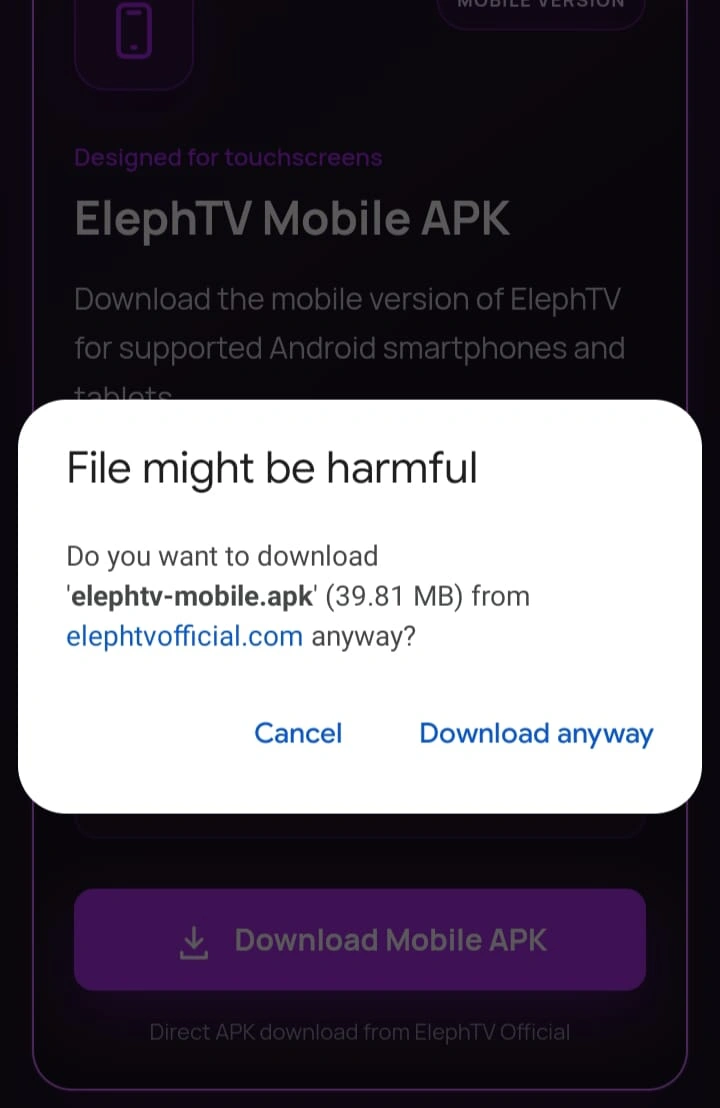
Step 2 screenshot Android browser warning for elephtv-mobile.apk with the Download anyway option

Select the image to view it at full size.

CONFIRM THE APK DOWNLOAD

Select “Download Anyway” When Prompted

Android or your browser may display a generic warning because the ElephTV APK is being downloaded outside an app store.

Before continuing, confirm that the displayed website is:

elephtvofficial.com

Also confirm that the filename is elephtv-mobile.apk. When both details are correct, select Download anyway.

Cancel the download when the browser shows an unfamiliar domain or an unexpected filename.

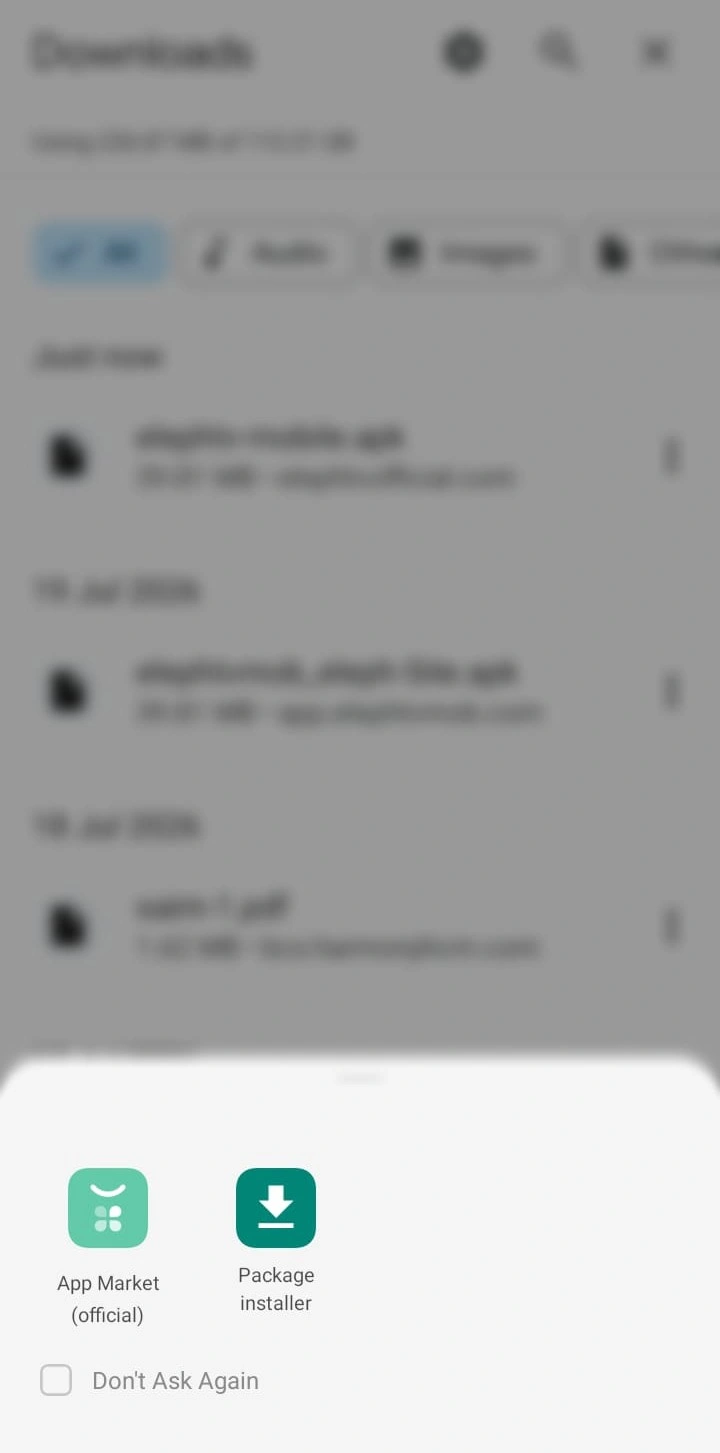
Step 3 screenshot Android installer selection screen showing Package installer

Select the image to view it at full size.

OPEN THE DOWNLOADED APK

Choose Your Android Package Installer

Wait for the ElephTV Mobile APK to finish downloading. Open your browser’s download section or your device’s Files app and select elephtv-mobile.apk.

When Android asks which application should open the file, select Package installer or your device’s normal APK installation tool.

The installer name and icon can differ between Samsung, Xiaomi, Oppo, Vivo and other Android manufacturers.

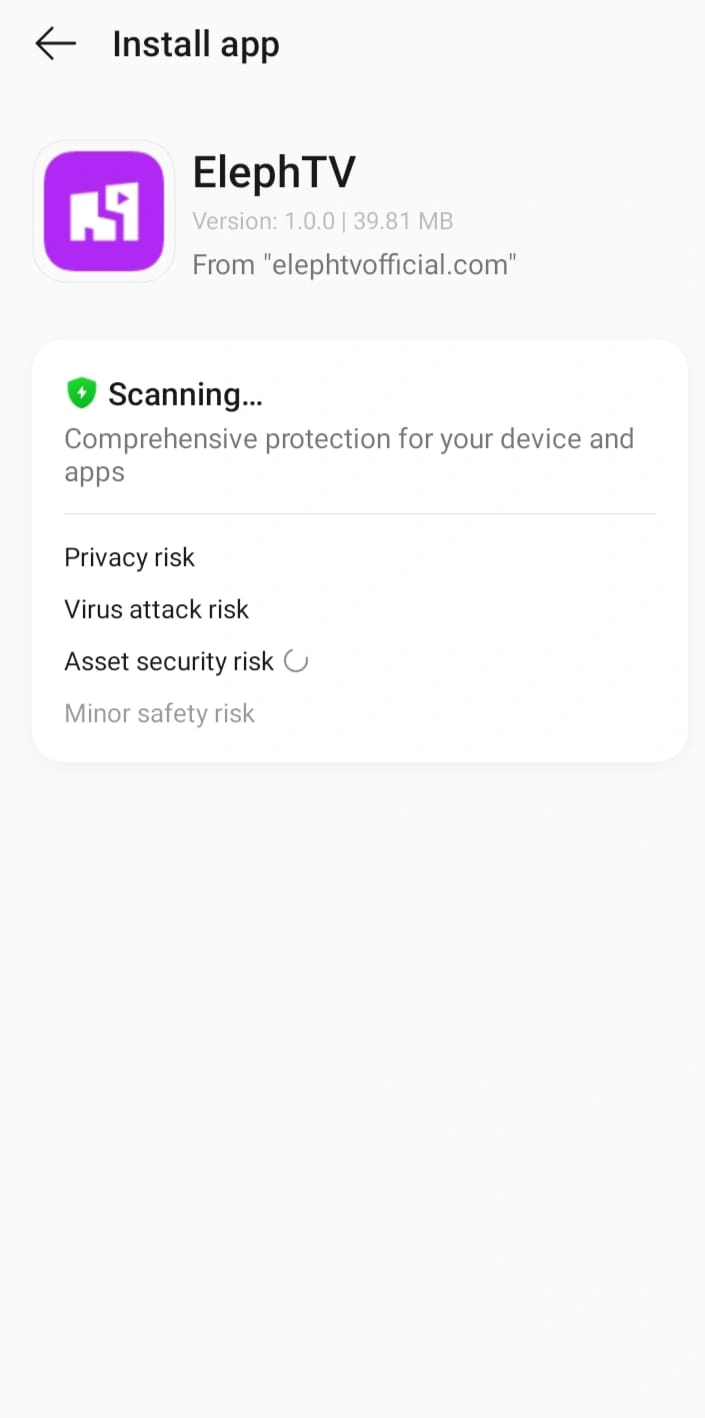
Step 4 screenshot Android device security scan during ElephTV Mobile APK installation

Select the image to view it at full size.

INSTALL THE ELEPHTV APP

Complete Installation and Device Security Checks

Review the installation screen and select Install. Wait while Android installs ElephTV on your device.

Some Android phones automatically scan newly installed APK files using their built-in security service. Allow the device to complete any security checks that appear.

When the installation is complete, select Open.

Do not disable Android security scanning merely to force an installation. Contact support when the official APK is repeatedly blocked.

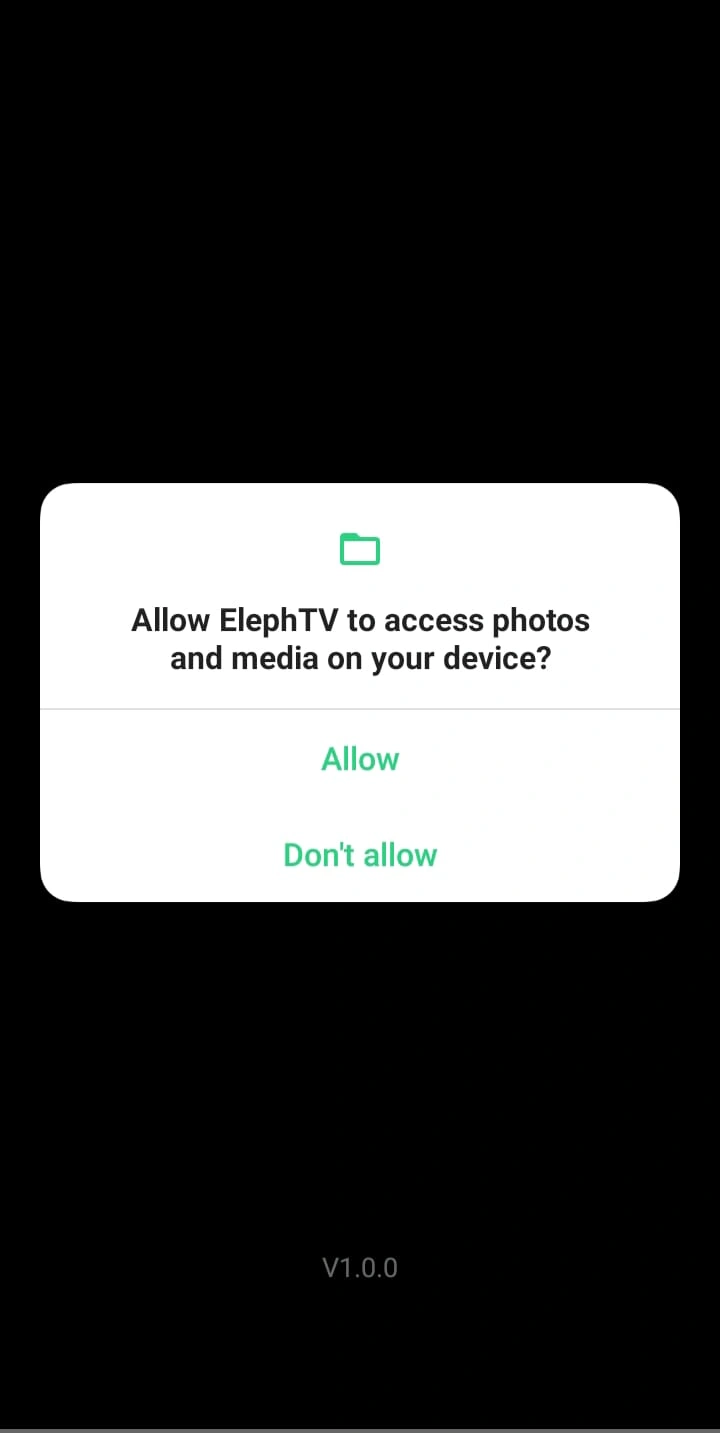
Step 5 screenshot ElephTV request to access photos and media on an Android device

Select the image to view it at full size.

REVIEW APP PERMISSIONS

Open ElephTV and Review the Permission Request

When ElephTV opens for the first time, it may request access to photos, media or files on your Android device.

Review the displayed permission message and allow access when it is required for the app’s download or media-management functions.

Permission wording can vary depending on the Android version installed on your phone or tablet.

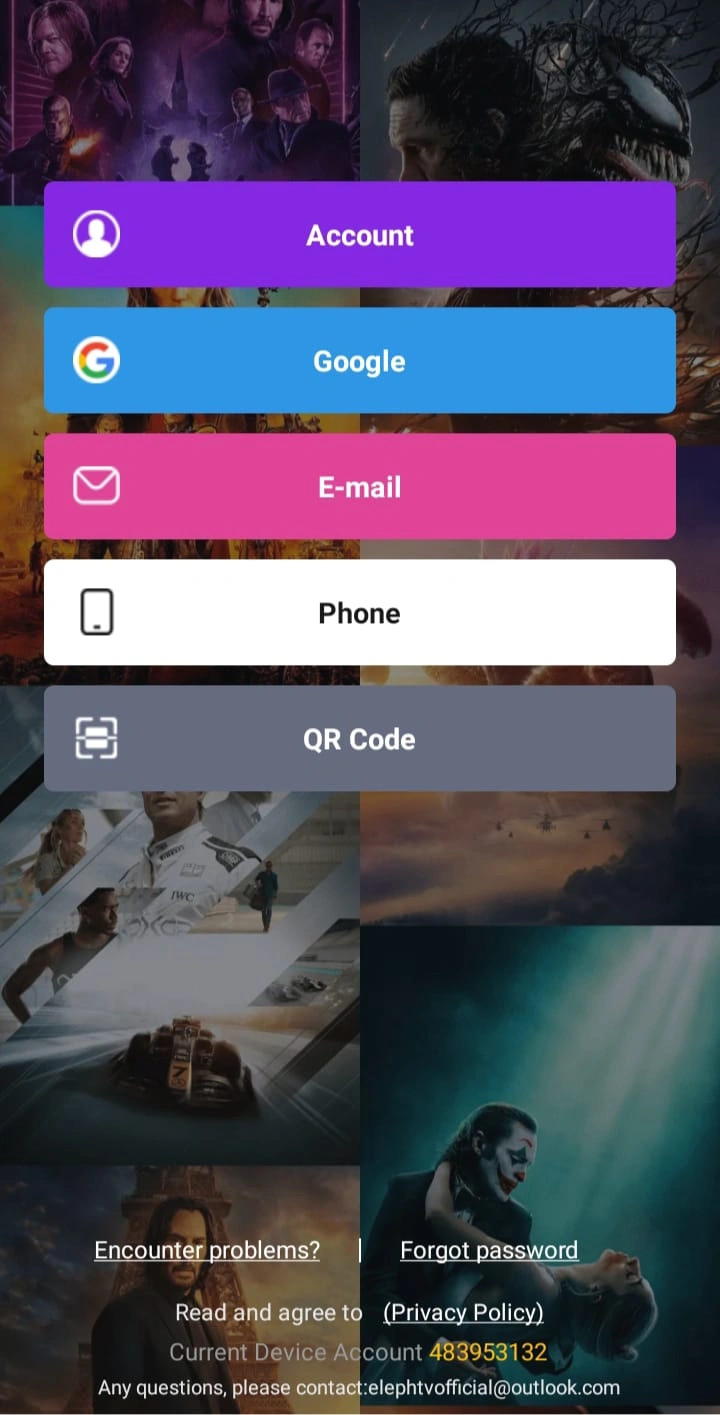
Step 6 screenshot ElephTV account screen showing Account, Google, Email, Phone and QR Code options

Select the image to view it at full size.

REGISTER OR ACTIVATE

Choose an ElephTV Account or Login Option

ElephTV may provide several registration or activation methods, including:

Select the method you prefer and complete the verification process. When email or phone verification is required, enter the one-time verification code sent to your selected account.

Keep your login details and one-time verification codes private.

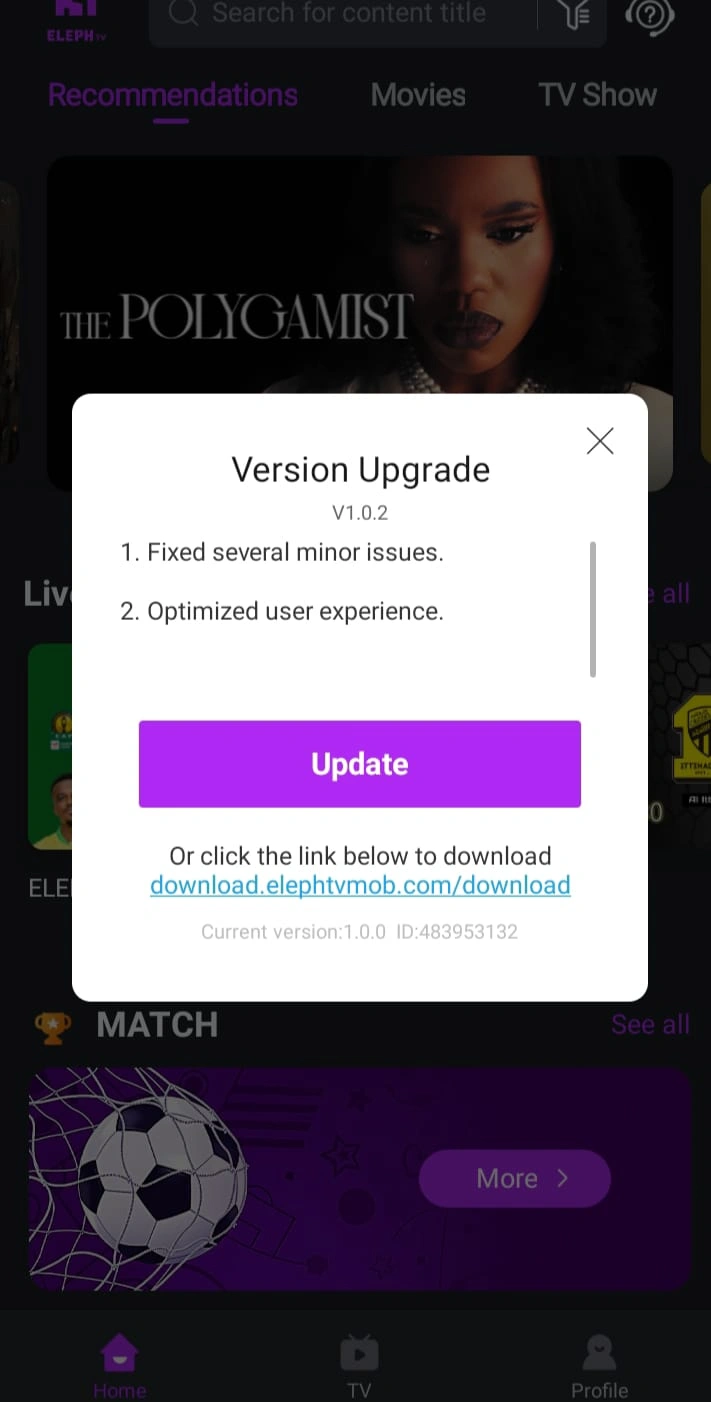
Step 7 screenshot ElephTV Version Upgrade prompt for version 1.0.2

Select the image to view it at full size.

UPDATE THE APP

Update ElephTV When a New Version Is Offered

After signing in, ElephTV may display a version-update notice. Select Update and follow the on-screen installation instructions.

After the update is complete, reopen ElephTV and continue with your trial or subscription activation.

App screens and version numbers may change when a newer ElephTV release becomes available.

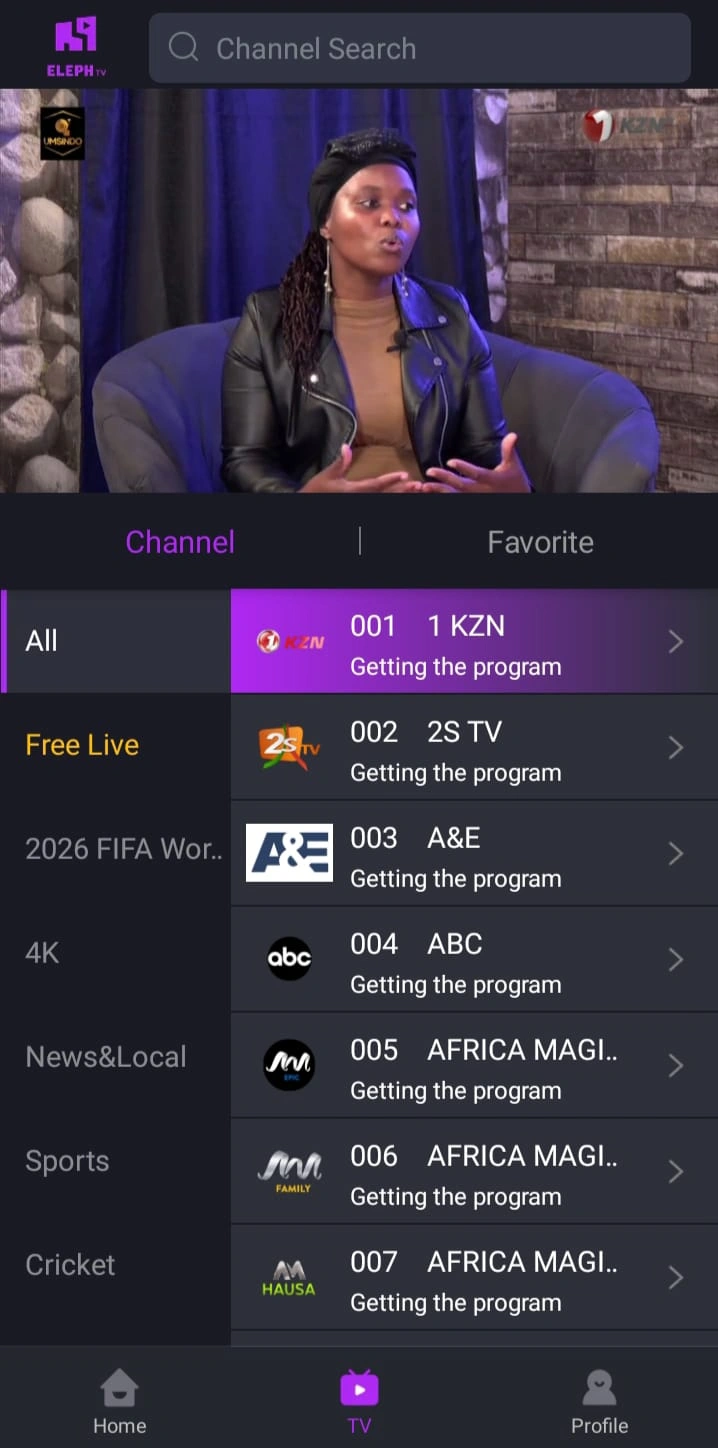
Step 8 screenshot ElephTV mobile interface ready for live TV and streaming

Select the image to view it at full size.

INSTALLATION COMPLETE

Start Using ElephTV on Your Android Device

Once installation, verification and any available update are complete, ElephTV will appear in your Android application list.

Open the app, complete your eligible trial or paid subscription activation and begin exploring the available live TV, sports, movies and series.

INSTALLATION COMPLETE ElephTV is ready on your device

ELEPHTV TV INSTALLATION

How to Install ElephTV on Android TV, Google TV, TV Box and Fire TV

Follow this step-by-step guide to download and install the ElephTV TV APK using the Downloader app. These instructions cover supported Android TV devices, Google TV, Android TV boxes, Fire TV and compatible Fire TV Stick devices.

SUPPORTED DEVICES Android TV, Google TV, TV Box and Fire TV
INSTALLATION FILE elephtv-tv.apk
DOWNLOAD SOURCE elephtvofficial.com

ELEPHTV DOWNLOADER CODE

Enter This Code in the Downloader App

Open Downloader on your television, enter the current ElephTV Downloader code and select Go. The code directs Downloader to the official ElephTV TV APK.

File: elephtv-tv.apk Size: Approximately 34.7 MB
DOWNLOADER CODE
ADD CODE
BACKUP INSTALLATION METHOD

Use the Direct ElephTV TV APK URL

When the Downloader code does not work, enter the complete direct URL below into Downloader instead.

https://elephtvofficial.com/downloads/apps/elephtv-tv.apk
Download TV APK
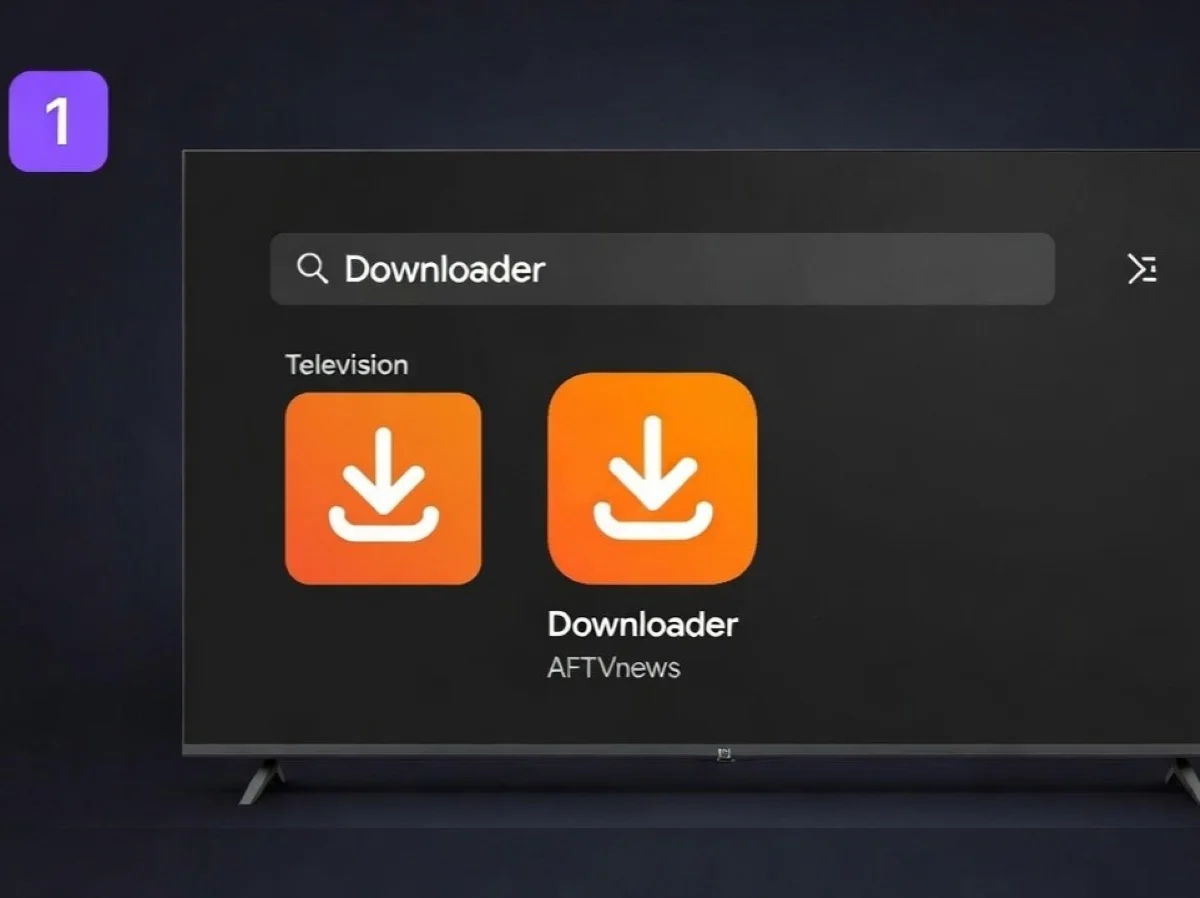
Search for and install Downloader by AFTVnews on a television device
Search for Downloader and confirm that the app is published by AFTVnews.

INSTALL DOWNLOADER

Find and Install Downloader by AFTVnews

Open the app store available on your Android TV, Google TV, TV box, Fire TV or Fire TV Stick.

Search for Downloader and confirm that you are selecting the app associated with AFTVnews. Install the app and open it after the installation is complete.

Avoid similarly named apps from unfamiliar publishers.

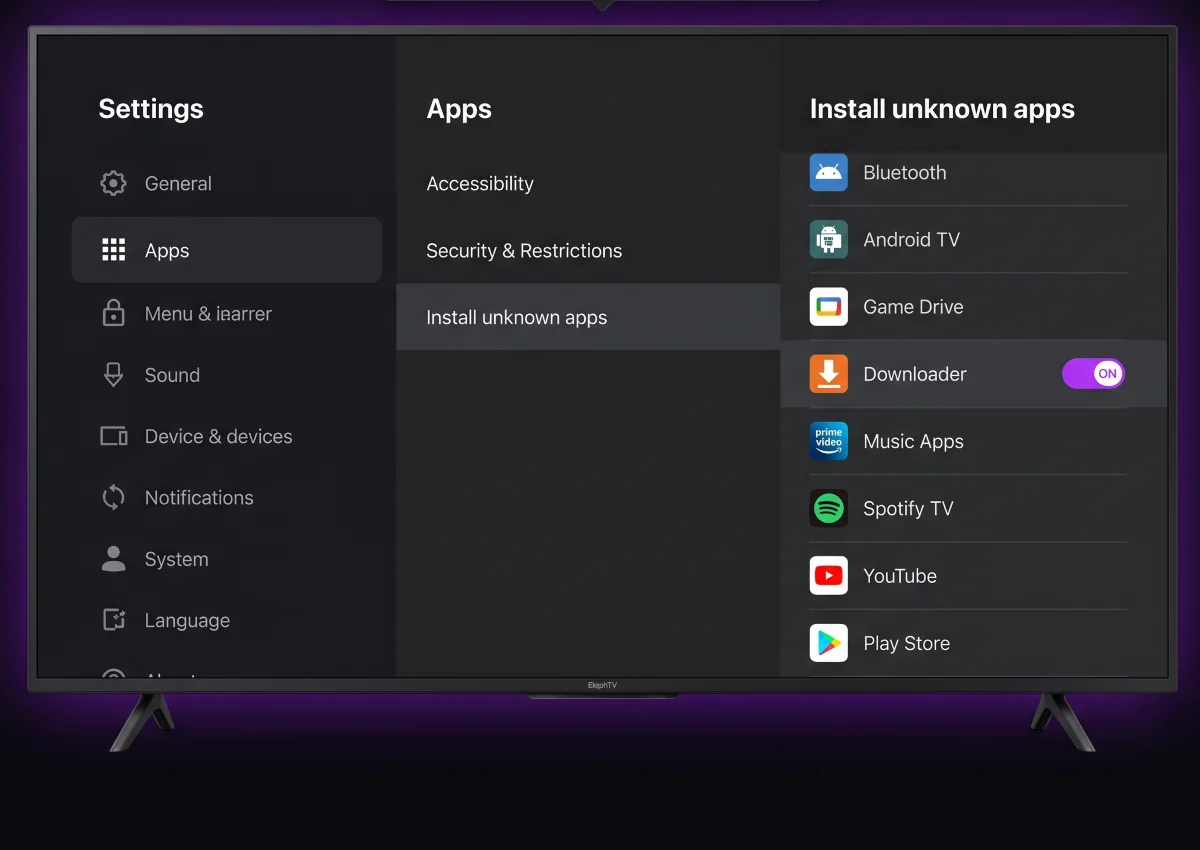
Allow Downloader to install unknown apps on Android TV or Google TV
Android TV and Google TV users should allow Downloader to install apps.
ANDROID TV, GOOGLE TV AND TV BOX

Allow Downloader to Install the ElephTV APK

Android TV and Google TV normally require permission before Downloader can install an APK file.

Open your device settings and look for an option similar to:

Settings Apps Security Install unknown apps Downloader

Turn the Downloader permission on. The exact menu names may differ depending on the television manufacturer and Android version.

Some devices display this permission only after your first attempt to open the downloaded APK.

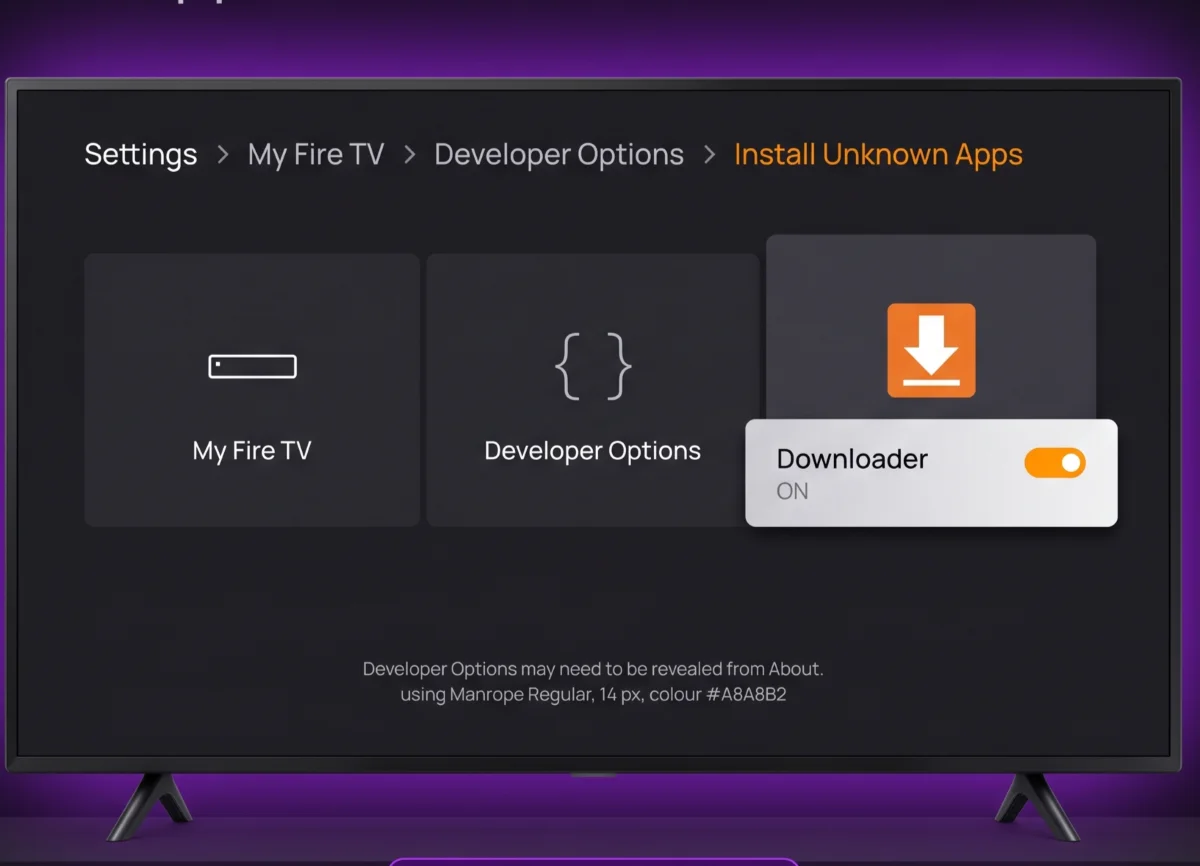
Enable Downloader under Install Unknown Apps on Fire TV or Fire TV Stick
Fire TV users should enable Downloader under Install Unknown Apps.
FIRE TV AND FIRE TV STICK

Enable Downloader on Fire TV or Firestick

On a Fire TV device, open the settings menu and follow a path similar to:

Settings My Fire TV Developer Options Install Unknown Apps Downloader

Set Downloader to On.

When Developer Options is hidden, open My Fire TV → About and select the device name several times until the developer menu becomes available.

ADB debugging is not required when installing ElephTV through the Downloader app.

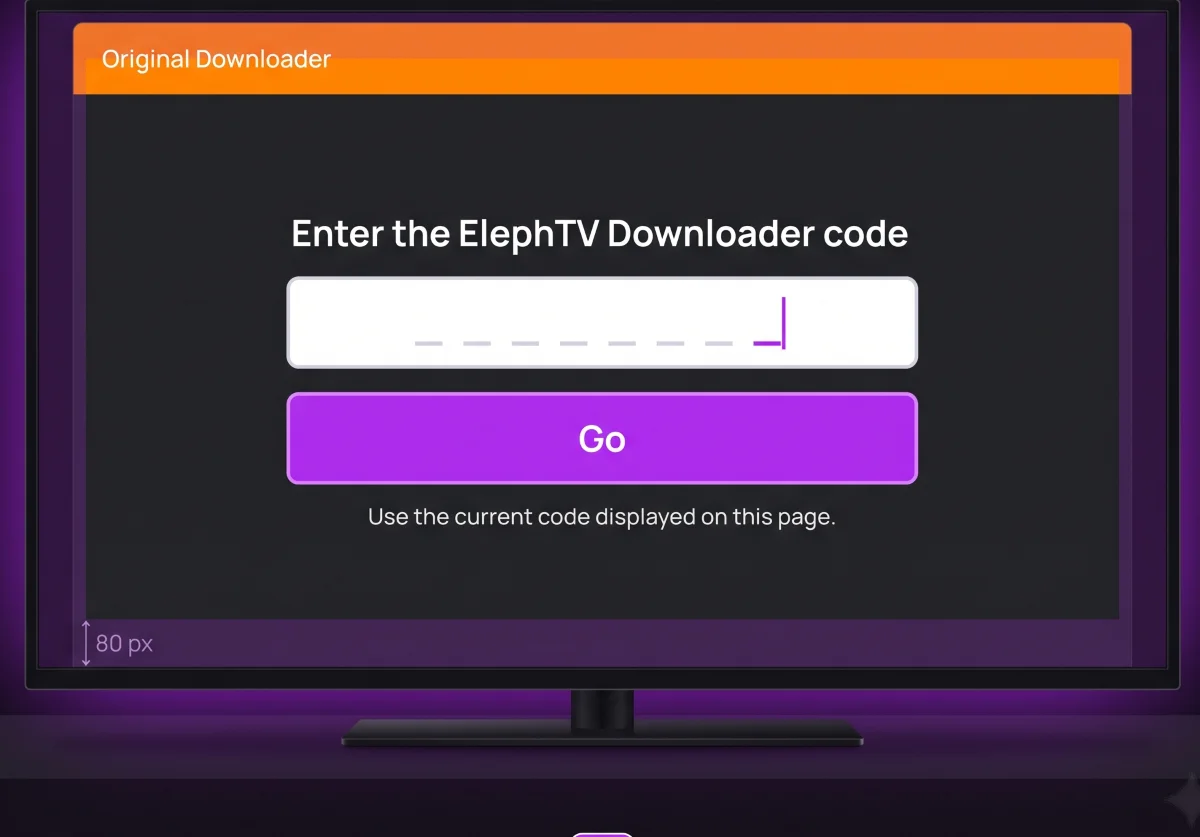
Enter the ElephTV Downloader code and select Go
Enter the current ElephTV Downloader code and select Go.

ENTER THE ELEPHTV CODE

Enter the ElephTV Downloader Code

Open Downloader and select the URL or code input field on its home screen.

Enter the ElephTV Downloader code displayed near the top of this section and select Go.

Current code ADD CODE

Downloader should resolve the code and connect to the official ElephTV TV APK hosted on elephtvofficial.com.

Enter the direct APK URL when the numeric code is unavailable or has recently changed.

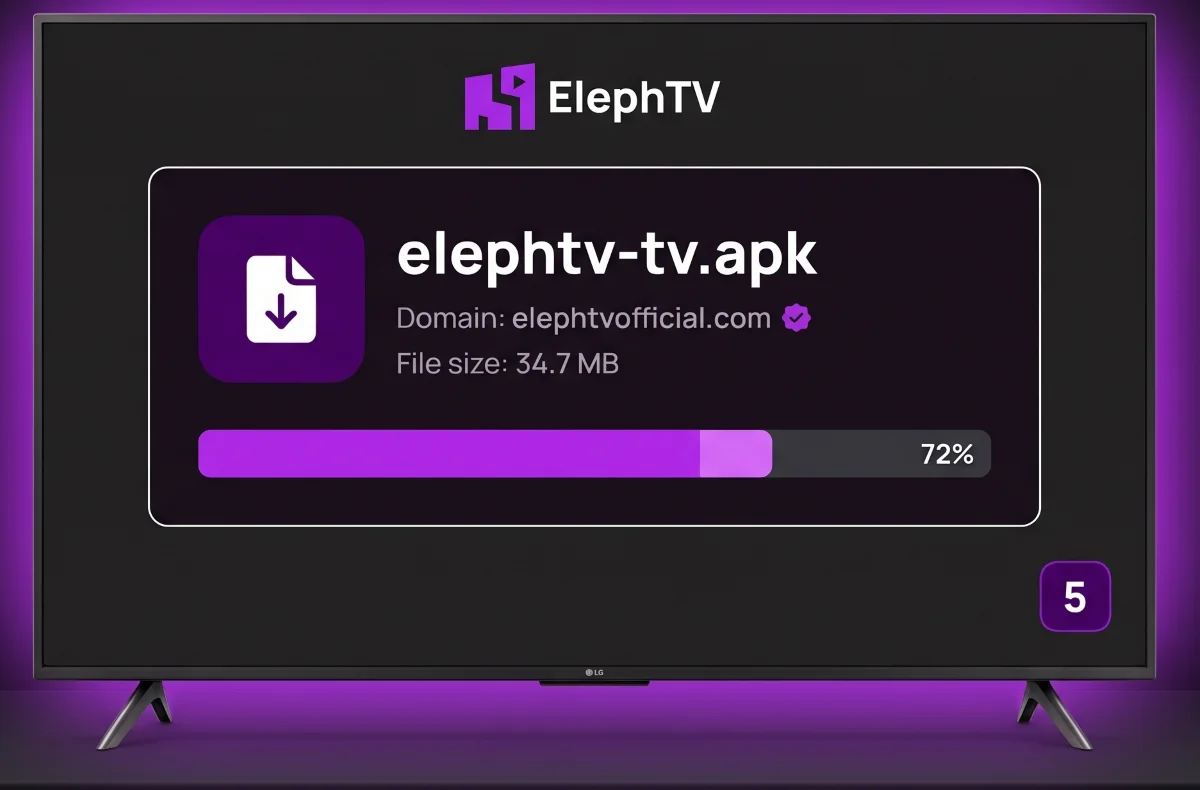
Verify the ElephTV TV APK filename, domain and file size before installation
Confirm the domain, filename and expected file size before installing the TV APK.

VERIFY AND DOWNLOAD

Verify and Download the ElephTV TV APK

Before continuing, review the download information displayed by Downloader.

Website
elephtvofficial.com
Filename
elephtv-tv.apk
Expected size
Approximately 34.7 MB

Allow the ElephTV APK download to finish before closing Downloader or turning off your television device.

Cancel the download when an unfamiliar domain, filename or unexpected file type appears.

Select Install to install the ElephTV TV APK
Select Install when the Android installation screen appears.

INSTALL ELEPHTV

Install the ElephTV TV App

After the APK finishes downloading, the Android installation screen should open automatically.

Select Install and wait for the installation process to complete. When the confirmation screen appears, select Open to launch ElephTV immediately or Done to return to Downloader.

Allow Google Play Protect or your device’s built-in security service to complete any requested scan.

Do not disable device security merely to force an APK installation.

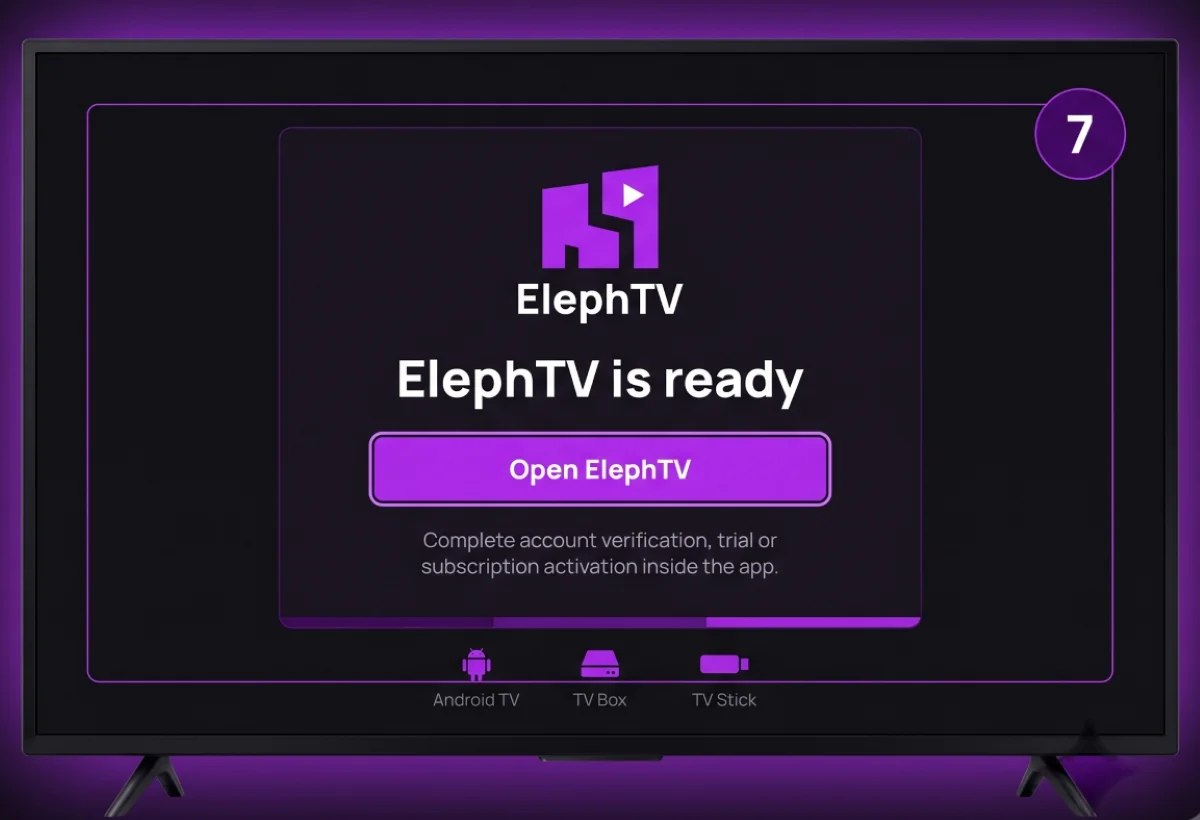
Open ElephTV and complete account, trial or subscription activation
Open ElephTV and complete the available account and activation steps.

COMPLETE SETUP

Open ElephTV and Activate Your Account

Launch ElephTV from your television’s app list and review any permissions requested during the first opening.

Follow the on-screen account or verification process. Complete your eligible seven-day trial or activate a paid subscription using the options available inside the app.

When an ElephTV update is offered, follow the displayed instructions to install the newer release.

INSTALLATION COMPLETE ElephTV is ready on your television device

ALTERNATIVE INSTALLATION METHOD

Install ElephTV TV APK Using a USB Drive

Use this method when Downloader is unavailable on your television device.
1

Download elephtv-tv.apk from the official page using a computer.

2

Copy the APK file to a compatible USB storage drive.

3

Connect the USB drive to your Android TV or TV box.

4

Open the APK with a file manager and approve the installation permission when requested.

Use the Official ElephTV Download Source

Download the ElephTV APK only from elephtvofficial.com. Do not install files received through unknown websites, messages or unofficial download pages.

SUPPORTED DEVICES

ElephTV Device Compatibility

ElephTV supports a range of Android phones, tablets and television devices. Choose the Mobile APK for touchscreen devices and the TV APK for Android TV, Google TV, TV boxes and compatible Fire TV devices.

TOUCHSCREEN DEVICES Choose the ElephTV Mobile APK
TELEVISION DEVICES Choose the ElephTV TV APK
MOBILE APK

Android Phones

Install the ElephTV Mobile APK on supported Android smartphones. This version is designed for touchscreen navigation and mobile displays.

Download
Mobile APK
Navigation
Touchscreen
MOBILE APK

Android Tablets

Use the ElephTV Mobile APK on Android tablets. The touchscreen interface works across both portrait and landscape tablet displays.

Download
Mobile APK
Navigation
Touchscreen
TV APK

Android TV Boxes

Use the ElephTV TV APK on compatible Android TV boxes and Android-based set-top boxes connected to a television.

Download
TV APK
Connection
Television display
TV APK

Fire TV and Fire TV Stick

The ElephTV TV APK can be installed on compatible Fire TV and Fire TV Stick devices through the Downloader app.

Download
TV APK
Installation
Downloader app
EMULATOR

Windows and Mac Computers

A native ElephTV desktop app is not currently confirmed. The Android Mobile APK may be used through a compatible Android emulator, although performance and controls can vary.

Method
Android emulator
Native app
Not confirmed

CHOOSE THE CORRECT ELEPHTV DOWNLOAD

Select the APK designed for your device

Device menus, permission wording and performance can vary by manufacturer, Android version and available device resources.

ELEPHTV TROUBLESHOOTING

ElephTV Download and Installation Troubleshooting

Use these solutions when the ElephTV APK will not download, install, open or update correctly on your Android phone, tablet, Android TV, Google TV, TV box or Fire TV device.

BEFORE TROUBLESHOOTING

Check the APK, internet connection and device storage

Confirm that you downloaded the correct ElephTV APK from elephtvofficial.com. Use the Mobile APK for Android phones and tablets, and the TV APK for Android TV, Google TV, TV boxes and compatible Fire TV devices.

Correct APK Stable internet Available storage

NEED TO REINSTALL ELEPHTV?

Download the correct APK for your device

Reinstalling the correct version can resolve incomplete downloads, installation conflicts and damaged app files.

SAFE APK DOWNLOAD

How to Download ElephTV APK Safely

Use the official ElephTV download source, verify the APK filename and keep your Android device’s security checks enabled throughout the installation process.

CHECK BEFORE INSTALLING

Confirm the source, filename and correct device version

Download the ElephTV APK only when the website address, filename and selected device version match the information below.

WEBSITE elephtvofficial.com
MOBILE FILE elephtv-mobile.apk
TV FILE elephtv-tv.apk
01

Use the Official ElephTV Website

Download ElephTV only from elephtvofficial.com. Avoid APK files shared through unknown websites, unofficial mirrors, messages or public download groups.

Verify the website address before downloading
02

Check the APK Filename

Android phones and tablets should download elephtv-mobile.apk. Android TV, Google TV, TV boxes and compatible Fire TV devices should use elephtv-tv.apk.

Cancel unexpected filenames or file types
03

Keep Device Security Enabled

Allow Google Play Protect or your device manufacturer’s built-in security service to complete any requested APK scan. Security messages and scan results can vary between devices.

Do not disable security to force installation
04

Restore Permissions After Installation

After ElephTV opens successfully, you may disable Allow from this source for your browser, file manager or Downloader app. TV users can also delete the downloaded APK to recover storage.

Keep the installed app and remove the installer file

Recommended

  • Download directly from the ElephTV website.
  • Choose the correct APK for your device.
  • Review every permission request before approving it.
  • Keep Android and ElephTV updated.

Avoid

  • Installing APKs from unknown download pages.
  • Accepting an unexpected filename or domain.
  • Disabling Android security scanning.
  • Sharing account passwords or verification codes.

OFFICIAL ELEPHTV DOWNLOADS

Choose the correct APK for your Android device

Use the mobile version for touchscreen devices and the TV version for television screens and remote navigation.

Security screens, permission names and installation menus can differ according to the device manufacturer and Android version.

FREQUENTLY ASKED QUESTIONS

ElephTV Download and Installation FAQs

Find answers about the ElephTV APK download, supported Android devices, installation, Downloader codes, updates and account activation.

DOWNLOAD HELP

Choose the correct ElephTV APK before installing

Use the Mobile APK for Android phones and tablets. Use the TV APK for Android TV, Google TV, TV boxes and compatible Fire TV devices.

APK Download Device Support Installation Help

READY TO INSTALL ELEPHTV?

Download ElephTV for Your Android Device

Choose the ElephTV Mobile APK for Android phones and tablets, or download the ElephTV TV APK for Android TV, Google TV, TV boxes and compatible Fire TV devices.

Free APK download 7-day trial for eligible new users Installation guidance included