ELEPHTV SUBSCRIPTION

ElephTV Subscription Plans and VIP Codes

Choose an ElephTV subscription plan and order your VIP or redeem code through WhatsApp. After payment confirmation, our support team will send your code and provide activation guidance.

7-day trial for eligible new users    ·   Payment guidance   ·   Activation support

elephtv-pricing-hero-page
How It Works

Get Your ElephTV VIP Code in Three Simple Steps

Choose your preferred subscription plan, contact our support team through WhatsApp and receive your VIP or redeem code after payment confirmation.

Choose Your Plan

Select the ElephTV subscription duration that best suits your viewing needs.

Order Through WhatsApp

Tap the Buy VIP Code button and send the preset message to our customer support team.

Receive and Activate

After payment is confirmed, support will send your VIP code and provide activation guidance.

ElephTV Pricing

Choose Your ElephTV Subscription Plan

Select the number of connections and your preferred subscription duration. Order through WhatsApp and receive your ElephTV VIP or redeem code after payment confirmation.

How many connections do you need?

Includes support for 1 Android device

Flexible Access

Monthly Plan

$ 6.60

1 month access

  • 1 supported Android device
  • Live TV, sports, movies and series
  • No advertisements
  • HD and Full HD availability
  • Live collection and replay
  • VIP or redeem code after payment confirmation
  • Activation and setup guidance
Buy VIP Code

Payment details confirmed through WhatsApp

Extended Access

6-Month Plan

$ 33

6 months access

  • 1 supported Android device
  • Live TV, sports, movies and series
  • No advertisements
  • HD and Full HD availability
  • Live collection and replay
  • VIP or redeem code after payment confirmation
  • Activation and setup guidance
Buy VIP Code

Payment details confirmed through WhatsApp

Long-Term Access

Annual Plan

$ 62

12 months access

  • 1 supported Android device
  • Live TV, sports, movies and series
  • No advertisements
  • HD and Full HD availability
  • Live collection and replay
  • VIP or redeem code after payment confirmation
  • Activation and setup guidance
Buy VIP Code

Payment details confirmed through WhatsApp

After selecting a plan, WhatsApp support will confirm the payment details. Your ElephTV VIP code will be supplied after payment confirmation, together with activation guidance.

VIP CODE ACTIVATION

How to Redeem Your ElephTV VIP Code

After purchasing an ElephTV subscription, you will receive a VIP code, also called a redeem code. Follow these steps to activate your selected plan inside the ElephTV app.

Open the Redeem Center

Open ElephTV and go to the profile or account section. Scroll through the available settings and select Redeem Center.

  1. Open the ElephTV app.
  2. Go to the profile or account menu.
  3. Select the Redeem Center option.

The VIP code supplied after payment is the same activation code you will enter through the Redeem Center.
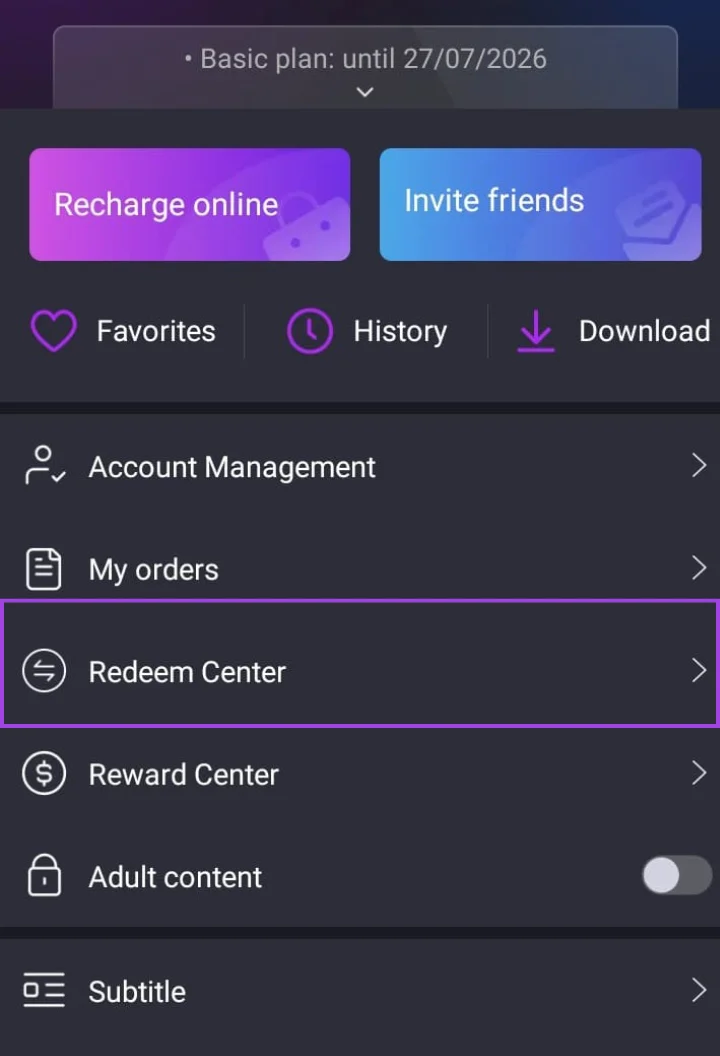
Step 1 ElephTV profile menu showing the Redeem Center option highlighted
Select “Redeem Center” from the ElephTV profile menu.

Enter and Confirm Your VIP Code

Enter the VIP or redeem code exactly as it was provided by our support team. Check the characters carefully and then select Confirm.

  1. Paste or type the supplied redeem code.
  2. Check that no spaces or characters are missing.
  3. Select Confirm to activate the subscription.
Important

Each activation code can only be used once. Keep your code private and enter it only on the intended ElephTV account.
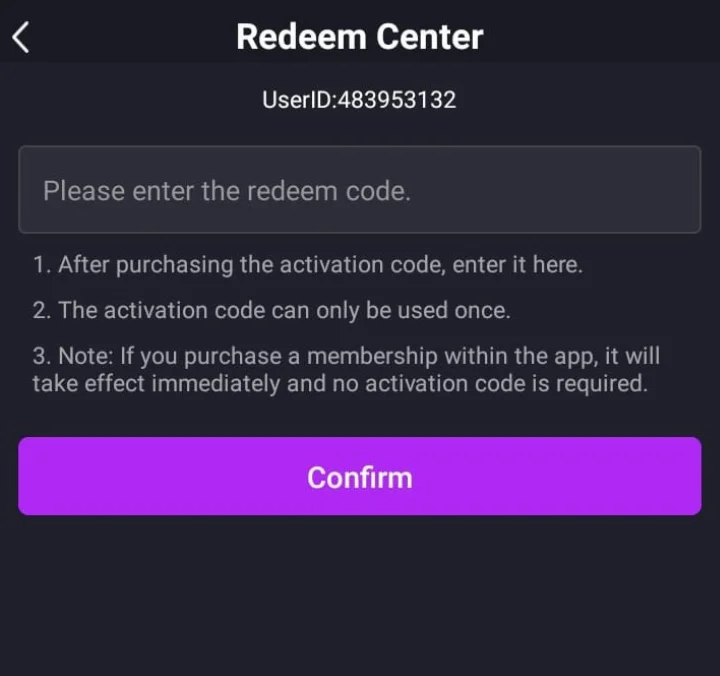
Step 2 ElephTV Redeem Center screen showing the redeem-code field and Confirm button
Enter the supplied VIP code and select “Confirm.”

Need Help Redeeming Your Code?

Contact support if your VIP code is not accepted or you need help completing the activation process.

Contact WhatsApp Support
Before You Order

Important ElephTV Subscription Information

Review these important details before ordering your ElephTV VIP or redeem code through WhatsApp.

Eligible 7-Day Free Trial

Eligible new users may receive a seven-day trial. A paid ElephTV subscription and VIP code are required to continue access after the trial ends.

Each VIP Code Is Used Once

Enter the supplied VIP or redeem code only on the intended ElephTV account. Keep the code private and do not share it publicly.

Code Delivery After Payment

WhatsApp support will confirm your selected plan and payment details. Your ElephTV VIP code will be supplied after payment confirmation.

Setup Help Is Included

Contact support if you need help entering your code, activating your subscription or resolving a code-related problem.

Downloading the ElephTV APK does not automatically activate a paid subscription.

Continued access after the eligible trial requires a valid VIP or redeem code. Confirm the plan, number of connections and subscription duration before completing payment.

Frequently Asked Questions

ElephTV Subscription and VIP Code FAQs

Find answers about ElephTV subscription plans, VIP codes, payments, supported connections and activation.

An ElephTV VIP code, also called a redeem code, activates paid subscription access inside the ElephTV app. The code is entered through the Redeem Center after it has been supplied by support.

Still Have a Subscription Question?

Contact our support team for help choosing a plan, ordering a VIP code or completing your ElephTV activation.

Ask on WhatsApp
Ready to Subscribe?

Get Your ElephTV VIP Code Today

Choose your preferred ElephTV subscription plan and number of connections, then contact our support team through WhatsApp. Your VIP code and activation guidance will be provided after payment confirmation.

Payment guidance VIP code delivery Activation support